
|
Dear Beachcombers,
Here's a quick refresher on the basics of Twitter. Let's take a minute to look at the anatomy of a tweet, the short microblogging messages sent out through Twitter.com or Twitter clients like Hootsuite, Seesmic, Tweetdeck and many others.
The maximum length of a tweet is 140 characters. That's characters not words so make every letter, number, space and punctuation mark count. As you type a tweet, the countdown box in the bottom right corner tells you how many characters are left. Just 34 characters left in the example below. 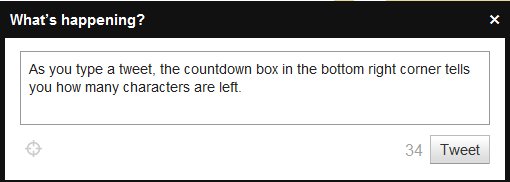 When you create a Twitter account, you get to choose an @name. My Twitter name is @AngelaCrocker but you could also choose a company name or nickname. In the example, below you can see that my pal Keri Jaehnig uses @connectyou as her Twitter name. Note that your @name is part of your unique Twitter URL. In my case, that's http://twitter.com/AngelaCrocker. When you create a Twitter account, you get to choose an @name. My Twitter name is @AngelaCrocker but you could also choose a company name or nickname. In the example, below you can see that my pal Keri Jaehnig uses @connectyou as her Twitter name. Note that your @name is part of your unique Twitter URL. In my case, that's http://twitter.com/AngelaCrocker.  Within tweets you'll often see people mention other users. Use someone's @name to mention them in your tweet. (This is a great networking tool!) In this example, Mattias Gronborg mentions @Robsearch. 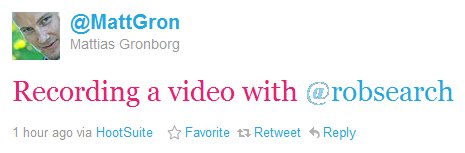 To save space when sharing links, you'll want to use a short link service. I prefer to use Bit.ly to do this, but there are URL shorteners in many Twitter tools. See how Michael Stewart, has used Hootsuite's tool - ht.ly - in this tweet.  Next up, is the # - better known in Twitter circles as the hashtag. Hashtags are used to mark brands, topics or conversations. Users can search for a hashtag to find folks tweeting about a topic of interest. Feel free to use a hashtag and/or create a new one. In this example, you'll see that Jess Kupferman used two. 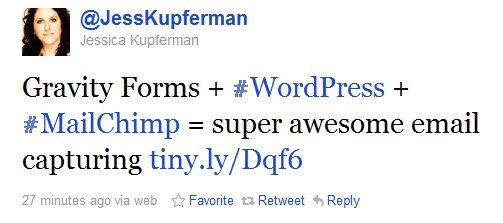 Best,
 p.s. . A quick housekeeping note: the Social Media Minute's going to move to a biweekly edition for July and August so you won't hear from me next week. Look for the next edition on July 21st. |
|